
Shared employer responsibilities
Joint-employment and co-employment questions can affect wage, leave, benefits, recordkeeping and client workflows.
Track joint-employment, wage, leave, payroll, tax, benefits, worker classification, licensing, privacy and multistate workforce sources your organization selects. Rixena helps operational, payroll, HR and compliance teams review changes in a shared workflow.
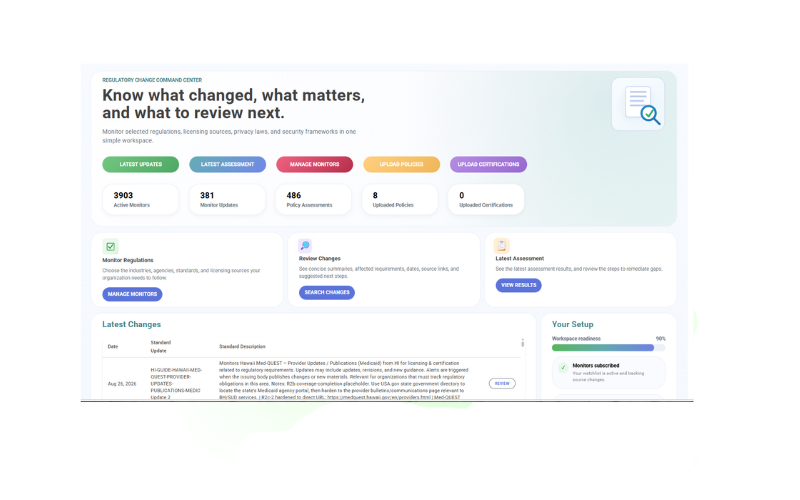
Staffing, PEO and payroll models can involve federal and state wage rules, client responsibilities, tax administration, licensing, benefits and data obligations. Rixena helps teams coordinate selected sources and review ownership.
Joint-employment and co-employment questions can affect wage, leave, benefits, recordkeeping and client workflows.
Minimum wage, overtime, pay statements, leave, predictive scheduling and final-pay requirements vary by location.
Worker status, payroll tax, unemployment, withholding and reporting developments may affect systems and service agreements.
A single change may require updates to payroll configuration, onboarding, notices, contracts, training and customer communications.
Build monitoring around the workforce models, payroll services, benefits responsibilities and states your organization supports.
Selected FLSA, FMLA, wage-hour, overtime, timekeeping and joint-employment materials relevant to staffing relationships.
Minimum wage, pay frequency, wage statements, sick leave, family leave, final pay and scheduling requirements from selected states.
Withholding, unemployment, payroll reporting, electronic filing and selected federal and state tax-administration updates.
Employee, independent contractor, exempt status and other classification developments that may affect payroll or client processes.
State registration, licensing, bonding, reporting and client-service requirements for selected staffing or PEO operations.
Benefit administration, workforce privacy, biometric timekeeping, data security and vendor-oversight topics.
Monitor availability and applicability vary by source, jurisdiction and organization. Your team chooses the watchlist it wants Rixena to follow.
Select your monitors, receive organized change intelligence and optionally connect policies for gap assessment.
Choose the agencies, regulations, standards, licensing sources and jurisdictions relevant to staffing, peo, and payroll providers.
See what changed, important dates, affected requirements, source links and suggested review areas.
Upload and assign wage, leave, payroll, classification, onboarding, privacy or client-service policies to the monitors they support.
Review potential policy gaps, remediation guidance, ownership and evidence in a consistent workflow.
Rixena follows the rule, bulletin, manual, guidance or licensing source your team selects.
The update is captured, summarized and organized so reviewers can focus on what changed.
Your team receives a focused review package instead of another unstructured alert.
Rixena can support providers serving different client industries, worker populations, benefit arrangements and jurisdictions without forcing every service line into the same watchlist.
Create your free monitoring accountReduce repeated searches across individual agency and program websites.
Give owners the source, dates, affected topics and review context in one place.
Connect selected requirements with the policies and procedures your team relies on.
Keep regulatory updates, assessments, review activity and supporting evidence organized.
Start with regulatory monitoring, then add optional policy assessment workflows when your team is ready.
Talk to AllgressOrganizations can select relevant federal, state and local sources covering joint employment, wages, leave, payroll tax, benefits, classification, licensing, privacy and workforce data. Available coverage depends on the selected monitors and sources.
Yes. Watchlists can be structured around jurisdictions, service lines, worker populations or internal teams based on how your organization operates.
Policy uploads are optional. Teams can assign selected payroll, wage, leave, classification, onboarding or privacy procedures to monitors when useful.
No. Your organization determines legal status and applicability. Rixena supports monitoring and structured review.
No. Rixena provides regulatory intelligence and workflow support; it does not provide legal, tax or HR advice.
Start with the wage, payroll, licensing and workforce sources that matter to your service model and client footprint.